What to look for in a grammar checker for Mac
1. It should work in every app you write in
Plenty of checkers live in a browser extension or their own editor, so they miss Mail, Slack, Notes, or your code editor. Look for one that works system-wide, anywhere you can select text.
In MacWriteBuddy: Select text in any app and press ⌃⌥G. The fixed version replaces it right where you typed, in native apps, browsers, and web apps alike.
2. You should see every change
A good checker fixes typos without flattening your voice, and shows you what it changed before it changes it.
In MacWriteBuddy: A preview marks every fix before anything is replaced, and ⌘Z undoes it after. Fix spelling & grammar corrects typos, grammar, and punctuation, and nothing else.
3. Know where your words go
Cloud checkers send what you write to their servers, usually under an account. If you write about clients, health, or anything private, look for a tool that can work on your computer, or that lets you choose the provider.
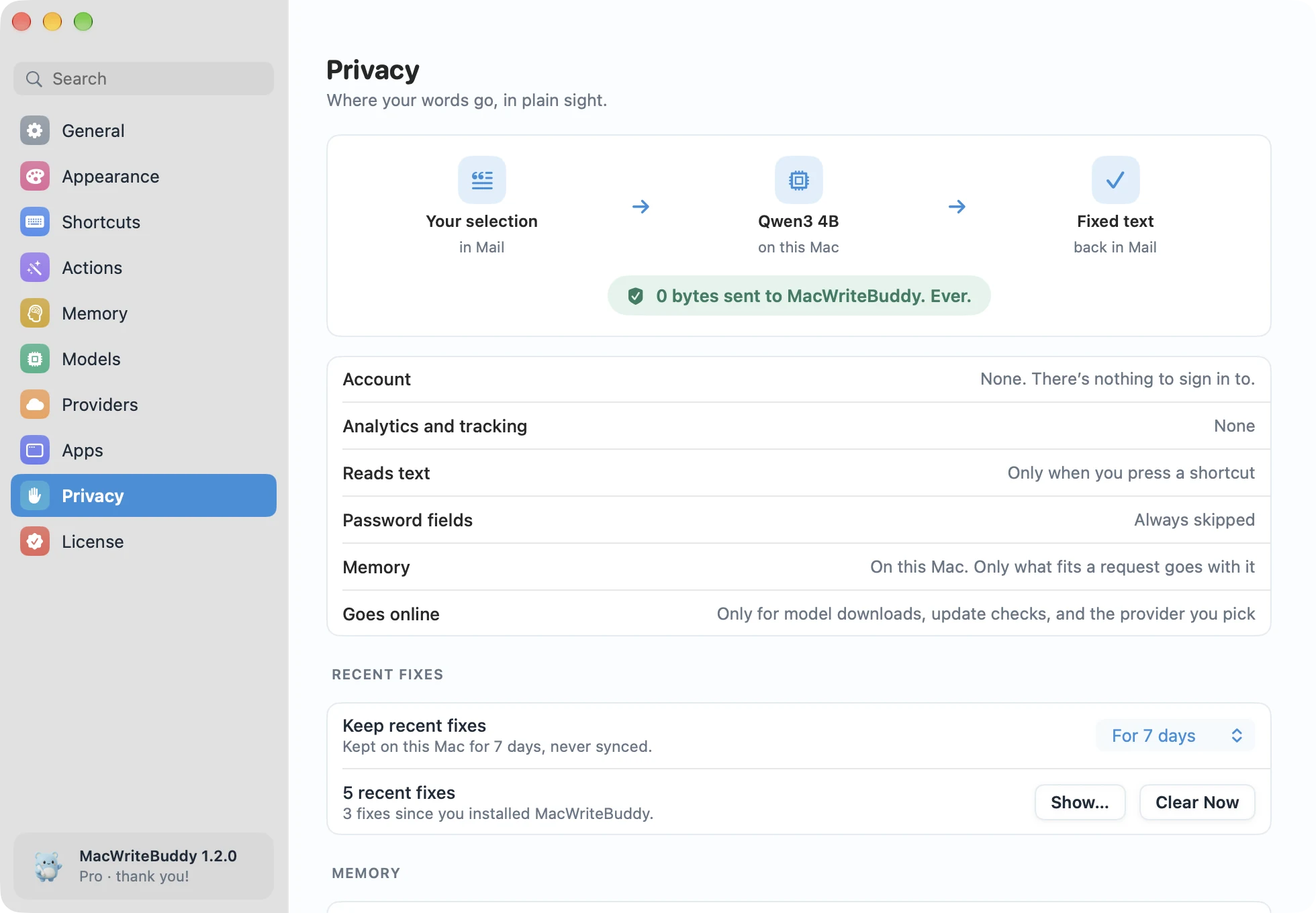
In MacWriteBuddy: No login and no account. MacWriteBuddy has no server that receives your writing: with a local model nothing leaves your Mac, and with a cloud provider your text goes straight to that provider with your key.
4. Offline is a feature
Small open models now run well on a Mac, especially on Apple silicon. A checker that can use one keeps working on a plane, in a café, or with Wi-Fi off.
In MacWriteBuddy: Download a model once from a short list picked for writing, or use Apple Intelligence on macOS 26 or later. No internet, no API key, no bill.
5. Choose the AI, not just the app
Models improve every few months. A checker that lets you pick the model, or bring your own API key, won’t leave you stuck with yesterday’s.
In MacWriteBuddy: Use a model on your Mac, your own Ollama or LM Studio server, or 16 cloud providers with your own key, including OpenAI, Anthropic, and Google Gemini. Each action can use a different model.
6. More than typos
Writing help increasingly means more than grammar: rewriting for tone, summing up long threads, or sharpening a prompt before you send it to an AI.
In MacWriteBuddy: With Pro: make it clearer, shorter, friendlier, or formal, translate, Summarize (⌃⌥M), Improve prompt (⌃⌥I), your own actions, and Memory.
7. Price
Grammar checkers range from free, to one-time purchases, to monthly subscriptions. Decide which features you need, and what they’re worth to you.
In MacWriteBuddy: Spelling and grammar fixes are free forever. Pro is a single payment of $39 (usually $79), with no subscription. Cloud providers bill your own key at their usual rates.
When another tool may suit you better
No tool is right for everyone, and MacWriteBuddy makes some deliberate trade-offs: it works when you ask rather than as you type, and it runs only on the Mac.
| If… | Consider |
|---|---|
| You want mistakes underlined as you type | MacWriteBuddy works when you ask, on the text you select. On a Mac with M1 or later running macOS 27, Apple Intelligence now proofreads as you type in most apps, at no extra cost. On any Mac, look at a checker that runs continuously, such as Grammarly or LanguageTool, or the spelling and grammar checking built into macOS (Edit › Spelling and Grammar). |
| You also write on iPhone, iPad, Windows, or the web | MacWriteBuddy is Mac only. Cross-platform services such as Grammarly and LanguageTool follow you across devices with an account. |
| Your team needs shared style guides | Business plans from cloud services such as Grammarly include style guides and admin controls. MacWriteBuddy’s settings and memory stay on each Mac. |
| You want the simplest built-in option | On a Mac with M1 or later, Apple’s Writing Tools can proofread and rewrite text in most apps at no extra cost, and on macOS 27 Apple Intelligence also proofreads as you type. Intel Macs can’t run Apple Intelligence. |
Is MacWriteBuddy the right grammar checker for you?
MacWriteBuddy suits you if you write in lots of different apps, want to see every change before it lands, and would rather your words stay on your Mac, or go only to the AI provider you picked. It also covers Macs that Apple’s built-in proofreading doesn’t: Intel Macs, and Macs that aren’t on macOS 27. Grammar fixes are free, so the easiest way to find out is to try it.
Take a closer look at each part of the app:
- Grammar checker · Grammar Checker for Mac That Works in Every App
- Offline & local AI · Offline Grammar Checker for Mac with Local AI
- Bring your own AI · Use OpenAI, Claude, Gemini, or Ollama on Mac
- Rewrite & translate · Rewrite Text on Mac: Clearer, Shorter, Formal
- Summarize · Summarize Emails and Articles on Your Mac
- Prompt improver · Improve AI Prompts in ChatGPT, Claude & Cursor
Further reading
More on choosing and using writing tools on a Mac:
- Grammarly Alternatives for Mac (2026): 7 Options Compared
- How to Use Apple Intelligence Writing Tools on Mac (2026)
- How to Spell Check on a Mac (and Check Grammar Too)
- Apple Intelligence on an Intel Mac? What Works Instead
- Is Grammarly Safe for Work? What AI Writing Tools Keep
- Best Local LLM for Writing and Grammar on a Mac (by RAM)