Summarize any email, thread, or article on your Mac.
Select a long email, a busy thread, or an article and press ⌃⌥M. MacWriteBuddy sums it up in a few lines, right where you’re reading, so you know what matters before you reply.
Version 1.2.2macOS 14 Sonoma or laterApple silicon & IntelHow to install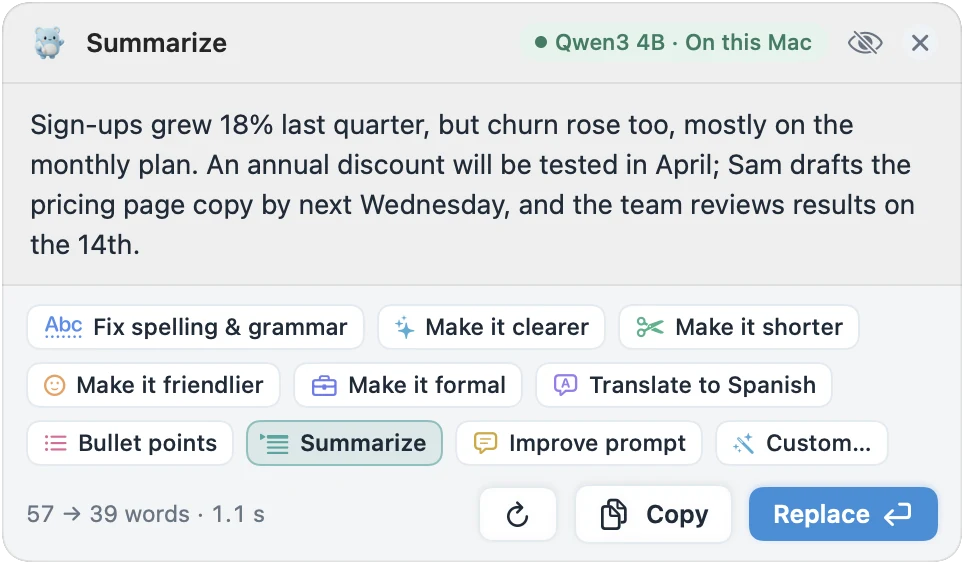
Highlights
- Starts with the main point, then decisions, deadlines, and who does what
- Two to four sentences, or a short list when it covers several things
- Shows how much shorter it got, like “57 → 39 words”
- Rather keep every point? Bullet points (⌃⌥B) turns a paragraph into a list
The main point first
Summarize starts with what matters, then the decisions, deadlines, and who does what, in two to four sentences, or a short list when the text covers several things.
- BEFORE
- Thanks everyone for joining today. We looked at last quarter’s numbers: sign-ups grew 18%, but churn also went up, mostly from customers on the monthly plan. We decided to test an annual discount in April, and Sam will draft the pricing page copy by next Wednesday.
- AFTER SUMMARIZE
- Sign-ups grew 18%, but monthly-plan churn rose too. An annual discount gets tested in April, and Sam drafts the pricing copy by next Wednesday.
Right where you’re reading
It works on whatever you select, in any app, so you never paste a thread into a chatbot. The preview shows how much shorter it got, like “57 → 39 words”, and you can copy the summary or replace the original with it.
Rather keep every point?
Bullet points (⌃⌥B) turns a rambling paragraph into a tidy list instead, right where it was.
Private, with the model you pick
Summarize with a model on your Mac and long emails never leave it. Or use your own provider key: text goes straight from your Mac to the provider, never through us. Summarize comes with MacWriteBuddy Pro.
How long are the summaries?
Usually two to four sentences, or a short list when the text covers several things. Each one starts with the main point, then the decisions, deadlines, and who does what.
Can it summarize long emails and articles?
Yes. Select a long email, a thread, or an article in any app and press ⌃⌥M. Summarize gives you the main point first, then the decisions, deadlines, and who does what, in two to four sentences or a short list. The preview shows how much shorter it is, and you can copy the summary or replace the original with it. Bullet points (⌃⌥B) is there too, for turning a paragraph into a list. Both come with Pro.
Does my text get uploaded to your servers?
Never. MacWriteBuddy has no server that receives your writing. With a local model, your text never leaves your Mac at all. With a cloud provider, it goes straight from your Mac to that provider using your key. The app only goes online to download the models you pick, to check for updates, and, with Pro, to check your license key.
How do I unlock Pro?
Buy Pro from the pricing section or from the app (Settings › License). Your license key arrives by email; paste it into Settings › License and click Activate. About once a day the app checks the key with our license server, which only ever sees the key, a random id for your Mac, its name, and the app and macOS versions. Never your writing.
Fewer typos.
A lot more you.
Write freely. Your buddy will tidy up when you press the keys.
Download for MacVersion 1.2.2macOS 14 Sonoma or laterApple silicon & IntelHow to install