How to make an email sound more professional
Most unprofessional-sounding emails share three problems: the point is buried, the ask is vague, and the sentences are padded with “just”, “maybe”, and “I was wondering”. Fix those and the tone mostly takes care of itself. Here’s a typical follow-up:
- BEFORE
- Hey Mark, Just checking in on this!! I was wondering if you maybe had a chance to look at the proposal I sent over last week? No worries if not, I know you’re super busy. Basically we kind of need an answer soon-ish because the client is asking. Let me know! Thanks!! Priya
- AFTER A PROFESSIONAL REWRITE
- Hi Mark, Could you review the Q3 proposal I sent last Tuesday and let me know by Thursday whether it’s approved? The client wants to confirm the start date on Friday. If anything needs changing, I’m happy to talk it through. Thanks, Priya
What changed:
- The ask comes first, in the opening sentence.
- It’s specific: “the Q3 proposal I sent last Tuesday” and “by Thursday” replace “this” and “soon-ish”.
- It gives a reason for the deadline, without pressure.
- The filler is gone: no “just”, “maybe”, “kind of”, “basically”, or double exclamation marks.
- It’s shorter: 43 words instead of 53.
Write a subject line that says what it’s about
The subject line decides whether your email gets read now, later, or never. Say what’s inside, and include the action or deadline when there is one.
Shorter is usually better. In a 2016 analysis of its customers’ emails, the email tool Boomerang found that subject lines of just three or four words (not counting “Re:” or “Fwd:”) got the most responses. That’s one company’s data from one year, not a rule, but it’s a useful nudge toward short and specific.
| Vague | Specific |
|---|---|
| Quick question | Invoice 4471: new due date? |
| Following up | Q3 proposal: approval by Thursday? |
| Meeting | Tuesday’s call moved to 3 p.m. |
| Update | Website launch moved to May 6 |
| Hello! | Intro: Sam Lee, our new design lead |
| IMPORTANT!!! | Action needed: sign contract by Friday |
Professional email greetings and sign-offs
Match the greeting and sign-off to how well you know the reader. When in doubt, start one step more formal, then mirror the other person: if Ana Patel signs her reply “Ana”, call her Ana.
| Who you’re writing to | Greeting | Sign-off |
|---|---|---|
| Someone you’ve never met, or a cover letter | “Dear Ms. Patel,” or “Dear Hiring Manager,” | “Kind regards,” or “Sincerely,” |
| A client or a senior colleague | “Hello Ana,” or “Dear Ana,” | “Best regards,” or “Kind regards,” |
| A colleague you work with often | “Hi Ana,” | “Thanks,” or “Best,” |
| A team or a group | “Hi all,” or “Hello everyone,” | “Thanks, everyone,” or “Best,” |
| A quick reply in a running thread | Their name, or straight to the point | “Thanks,” or just your name |
Skip “To whom it may concern” when you can find a name, “Hey” with someone you don’t know, and “I hope this email finds you well”. Open with something real instead:
- “Thanks for your quick reply.”
- “Following up on Tuesday’s call, …”
- “I’m writing to ask about …”
- Or simply start with the point.
How long should a professional email be?
Short enough to read in one go, with nothing the reader has to dig for. The same Boomerang analysis found the sweet spot was 50 to 125 words: emails in that range got replies most often. It also found that simple writing beat complicated writing, with emails at a third-grade reading level getting 36% more responses than ones written at a college level.
So “professional” doesn’t mean long words. Use the plainest accurate word, keep one idea per paragraph, and cut:
- Openers that delay the point, like “I just wanted to reach out to …”
- Restating the whole thread when one line of context will do
- Hedges: “I think maybe”, “sort of”, “just”, “a bit”
- Closers that say nothing, like “Please do not hesitate to contact me”. Try “Let me know if you have questions.”
In MacWriteBuddy: Replying to a long thread? Select it and press ⌃⌥M to summarize it: the main point first, then decisions, deadlines, and who does what. Then select your own draft and press ⌃⌥S (Make it shorter) to trim it. Both are part of Pro.
Ask one to three clear questions
People reply to emails that are easy to answer. The same 2016 Boomerang data found that emails asking one to three questions were 50% more likely to get a response than emails asking none. Make each question specific, add a date if you need one, and number them. More than three? That’s often a sign you need a short call.
- BEFORE
- Let me know your thoughts on the deck when you get a chance.
- AFTER A CLEARER ASK
- Two quick questions on the deck before Friday’s pitch: 1. Is the pricing on slide 4 final? 2. Can we cut the appendix? A yes or no on each is plenty.
Professional ways to say common phrases
Casual phrases are fine with people you know well. With clients, managers, and anyone new, these swaps sound polite without sounding stiff.
| Instead of | Try |
|---|---|
| “No worries” | “Not a problem at all.” “Happy to help.” “Of course.” |
| “Sounds good” | “That works for me.” “Agreed, let’s go ahead.” |
| “Just a heads up” | “I wanted to let you know that …” “Please note: …” |
| “Just checking in” | “Following up on the contract I sent on May 2.” |
| “Per my last email” | “As I mentioned on Tuesday, …” “To recap: …” |
| “Sorry for the late reply” | “Thank you for your patience.” |
| “I hope this email finds you well” | Start with the point, or “Thanks for your note.” |
| “I was wondering if you could …” | “Could you …?” |
| “Sorry to bother you” | “When you have a moment, could you …?” |
| “ASAP” | “By 3 p.m. Thursday” (a real time and date) |
| “Let me know your thoughts” | “Could you approve this by Friday?” |
| “Does that make sense?” | “Let me know if any part is unclear.” |
| “Please advise” | “Which option do you prefer?” “How would you like me to proceed?” |
| “Kindly revert” | “Could you reply by Friday?” |
| “Please do the needful” | “Could you please [the specific action]?” |
| “As per our conversation” | “As we discussed, …” |
| “Thanks in advance” | “Thank you for your help with this.” |
| “Thanks!!” | “Thank you for turning this around so quickly.” |
| “I think maybe we could …” | “I recommend …” “Let’s …” |
| “I don’t know” | “I’ll find out and get back to you by Friday.” |
| “That’s not my job” | “That’s outside my area, but Priya in Finance can help.” |
| “You forgot the attachment” | “It looks like the attachment didn’t come through. Could you resend it?” |
| “Can we hop on a call?” | “Could we talk for 15 minutes on Thursday or Friday?” |
| “I’ll circle back” | “I’ll send the numbers by Wednesday.” |
Professional way to say “no worries”
Fine with a colleague you know. With a client or a manager, try “Not a problem at all”, “Happy to help”, or “Of course”. If someone apologized for a slow reply, “Thanks for getting back to me” accepts it gracefully.
Professional way to say “sounds good”
“That works for me” or “Agreed, let’s go ahead”. Better still, confirm the detail so nobody has to ask again: “Thursday at 10 works for me. I’ll send the invite.”
Professional way to say “heads up”
Try “I wanted to let you know that …”, “Please note: …”, or, with colleagues, “FYI: …”. If the heads-up is the whole email, put it in the subject line: “FYI: office closed Monday”.
Professional way to say “just checking in”
It makes the reader work out what you want. Name the thing and the next step instead: “Following up on the contract I sent on May 2. Could you let me know by Friday whether you’d like any changes?”
Professional way to say “per my last email”
It can read as a reprimand, even when you don’t mean it to. Try “As I mentioned on Tuesday, …” or “To recap: …”, then repeat the key detail: “The deadline is still June 3.”
Tip: Drafted it with an AI chatbot? Read it aloud and cut anything you wouldn’t say to the person, like stock openers and over-the-top thanks. For better drafts in the first place, see how to write better prompts for AI.
Check spelling and grammar before you send
A typo in a client’s name undoes careful wording. On a Mac, the built-in checker underlines misspellings in red and grammar errors with a dotted blue line. In Mail and most other apps, choose Edit › Spelling and Grammar › Check Document Now, or press ⌘; to jump to the next misspelled word. If your Mac runs macOS 27 with Apple Intelligence, Apple says it also proofreads as you type in most apps. Our guide to spell checking on a Mac covers the rest.
Then check what spell checkers can’t:
- The recipient’s name, title, and company
- Dates and weekdays that match (“Tuesday, May 6”)
- Numbers, prices, and links
- The attachment you mention is actually attached
- Reply versus Reply All, and who’s in Cc
In MacWriteBuddy: Select your draft in Mail, your browser, or any app and press ⌃⌥G. MacWriteBuddy fixes spelling, grammar, and punctuation, keeps your tone, and shows every change before it’s replaced. It’s free forever, on macOS 14 or later, Intel Macs included.
Make an email more formal or friendly on a Mac
If your Mac supports Apple Intelligence (M1 or later, or a MacBook Neo, with Apple Intelligence turned on), Apple’s Writing Tools can change the tone of an email for free. Here’s how on macOS 27, from Apple’s guide:
- Select the text you want to change, in Mail or most other apps.
- Control-click the selection, choose Writing Tools, then Show Writing Tools.
- Click Rewrite, then click Friendly, Professional, or Concise.
- When you’re happy with it, click Done.
Our Apple Intelligence Writing Tools guide covers the requirements, a keyboard shortcut, and what to do when Writing Tools doesn’t show up.
MacWriteBuddy puts similar rewrites on their own shortcuts, in any app: Make it formal (⌃⌥P), Make it friendlier (⌃⌥F), Make it shorter (⌃⌥S), and Make it clearer (⌃⌥C). Every rewrite opens in a preview first, and you can make your own actions too, like “Reply politely”. These are part of MacWriteBuddy Pro, a one-time payment of $39 (usually $79); fixing spelling and grammar stays free.
- BEFORE
- hey, cant make it, sorry
- AFTER MAKE IT FORMAL
- Unfortunately, I won’t be able to attend. My apologies.
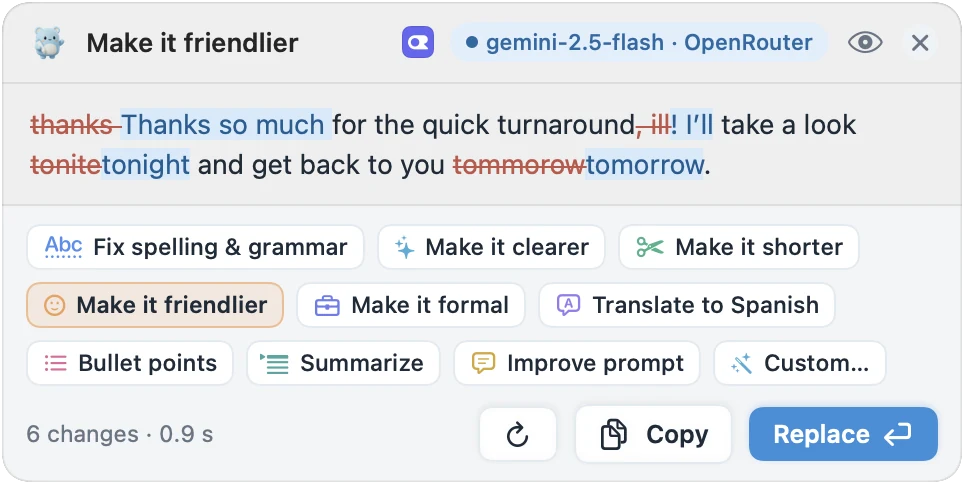
Which should you use? If your Mac supports Apple Intelligence and you only change the tone now and then, Writing Tools is free and already there. MacWriteBuddy makes more sense on an Intel Mac or macOS Sonoma, if you want one key per tone, or if you want to choose the AI model, including one that runs entirely on your Mac.
Pre-send checklist for a professional email
- The subject line says what it’s about, plus any deadline.
- The first two lines say why you’re writing and what you need.
- Each ask has a date or a clear next step, with one to three numbered questions at most.
- The greeting and sign-off match how well you know the reader.
- No filler: “just”, “I was wondering”, “I hope this finds you well”.
- Names, dates, numbers, and links are correct, and the attachment is attached.
- Spelling and grammar are checked.
- Wrote it while annoyed? Reread it after a break.
- Read as the recipient, it’s obvious what to do next.
Sources
- Boomerang blog: tips for getting more responses to your emails, with data (Feb 12, 2016)
- Apple Support: Use Writing Tools to write, improve, and summarize content on Mac
- Apple Support: Get typing suggestions and correct mistakes on Mac
- Apple Support: Mac keyboard shortcuts
- Apple Support: Get started with the next generation of Apple Intelligence
- Apple Newsroom: Siri AI announcement, including proofreading as you type (September 2026)